Garmin Explore™
- 3.5
- Rating
- 1.00M
- Installs
- Free
- Price

 Analysis by App-foxy
I approached Garmin Explore™ as a companion rather than a replacement for a normal navigation app. It is a free Maps & Navigation app from Garmin, built around planning trips for compatible Garmin devices and keeping important location information close at hand. That distinction matters: its value is strongest when you already use Garmin equipment, while someone looking only for turn-by-turn directions on a phone may find a conventional map app more immediate.
After spending time with its planning workflow, I found the app most interesting when a journey involves more than simply entering an address. Routes, saved places, tracks, and trip preparation all feel more useful here than they would in a basic everyday map. The experience is less about replacing your phone’s default map and more about preparing an outing carefully, then taking that plan with you.
The current Android listing shows a 3.7 average from around 5,300 ratings and more than 400 written reviews, with over a million installs. It is rated for Everyone, costs nothing to download, and the current version is 4.14.1. Those figures suggest a well-established tool with a mixed but substantial user base, not a niche experiment. Garmin released it on October 11, 2018, and the minimum operating system is Android 9.
You May Also Like

 Blood Strike: 2.5 Anniversary
Blood Strike’s Loadouts Turn Every Drop Into a Tactical Gamble
A close look at Blood Strike’s custom loadouts: how fast access to signature weapons reshapes its battle royale rhythm, rewards preparation, and narrows the gap between fights.

 Pandora - Music & Podcasts
Pandora’s Music Is Easy to Start, but Harder to Recover
Pandora’s strength is its low-effort path from a seed to a station. Its weak spot is how much confidence it asks you to place in connection, setup, and quiet recovery.

 8 Ball Pool
 Is Built on Rivalries, Rematches, and Routine
A close look at the rivalries, rematches, shared routines, and unanswered safety questions that turn a quick pool match into a persistent mobile community.

 Samsung Music
’s Quiet Strength Is Playing What You Already Own
Its reach comes less from spectacle than from dependable access to a personal library. That simplicity is both the app’s strongest retention engine and its ceiling.

 AccuWeather: Weather Radar
AccuWeather Review: A Quick, Clear Forecast for Everyday Decisions
For everyday plans, the best forecast is the one you can understand quickly. AccuWeather makes rain timing, radar, and local conditions easy to act on, with a few trade-offs.

 Hill Climb Racing
Why Hill Climb Racing Still Turns Crashes Into One More Run
A tiny car, a bumpy hill and one more upgrade: Hill Climb Racing keeps resurfacing because its simple chaos makes every near-miss feel personal.
More From Our News Desk



How Garmin Explore fits into a real trip
I use Garmin Explore most effectively when I treat it as the start of a trip, not a screen everyone in the car should edit at once. Before leaving, I can settle the route and places with whoever is traveling, then keep the plan consistent across the outing. That shared routine is useful, but it also makes account and device boundaries worth thinking through before the first trip.
A planning tool first, a navigation app second
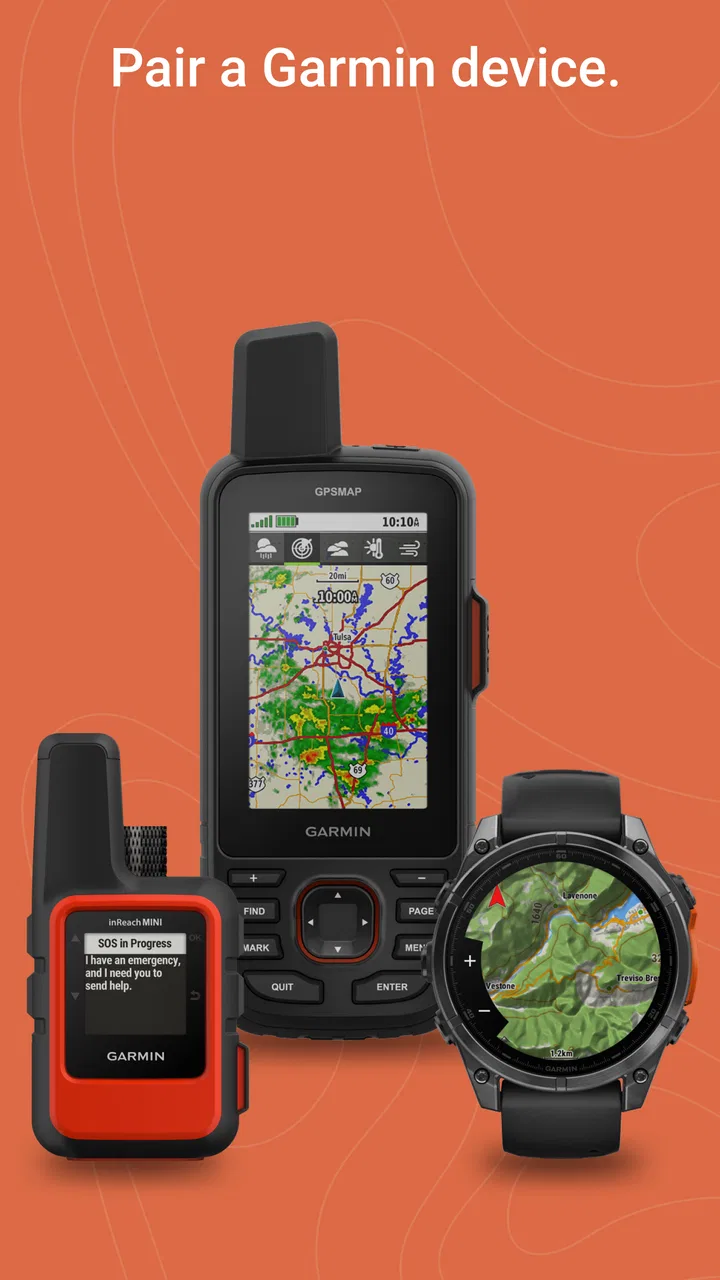
The easiest mistake is to judge this app only by asking whether it can replace a familiar phone map. That is not where it makes the strongest case. Garmin Explore is designed as a complete mobile trip-planning solution for compatible Garmin devices, so the phone app and the supported hardware are intended to work together. If you own one of those devices, the app becomes a place to prepare and organize a trip before you leave, rather than merely a screen that tells you where to turn next.
That approach changes how I use it. Instead of opening a map only after I am already lost or late, I can prepare a route, check the shape of the journey, and keep useful locations together. A saved destination is more valuable when it belongs to a wider plan: a starting point, a stop, a campsite, a meeting place, or a return route. The app encourages that kind of thinking.
It is particularly suitable for people who spend time outdoors, travel through unfamiliar areas, or use Garmin hardware as part of their normal routine. A driver who only needs a quick route across town will probably get a simpler experience elsewhere. Garmin Explore asks the user to care about preparation, and that extra structure is either its main advantage or its main inconvenience, depending on the trip.
An everyday scenario where it earns its place
Imagine preparing a weekend drive that includes several stops rather than one final address. I would begin by organizing the places I expect to visit, reviewing the route on the phone, and making sure the plan is ready before leaving home. Once the compatible Garmin device is part of the workflow, the phone is no longer the only screen I need to consult. That can make the journey feel calmer, especially when I do not want to keep stopping to rebuild a route from scratch.
The same idea applies to a day outdoors. A trailhead, parking area, viewpoint, and backup destination can be treated as parts of one outing instead of unrelated pins. The benefit is not flashy; it is the reduction of small decisions during the trip. I spend more time preparing at home and less time improvising when conditions, battery, or attention are limited.
One useful habit is to review the plan twice: once while it is still easy to edit, and again shortly before departure. This catches the common problem of saving a place without considering how it fits into the complete journey. Garmin Explore is at its best when it is used as a preparation desk, not opened for the first time in a hurry.
What the app does well for Garmin owners
The strongest part of the experience is the relationship between a planned trip and compatible Garmin devices. Garmin is not treating the phone as an isolated navigation product; it is using the phone as a practical control and planning surface for its wider ecosystem. That makes the app more meaningful for an existing Garmin owner than for someone comparing standalone map apps.
I also like the way this encourages deliberate organization. A normal map application often prioritizes immediate search: find a place, get directions, arrive. Explore is more comfortable when the question is broader: what am I doing over the whole day, and how should I arrange the information before I go? That difference is easy to overlook in a short store summary, but it affects whether the app feels useful every week or only occasionally.
Another advantage is continuity. A trip prepared on the phone can be part of the same navigation setup as the compatible Garmin device, rather than being trapped in a note, screenshot, or collection of unrelated map searches. For people who already rely on Garmin equipment, that can remove friction at exactly the point where a journey becomes more complicated than a single destination.
Where the workflow can feel less natural
The same ecosystem focus creates a limitation. If you do not have compatible Garmin hardware, the reason to choose this app becomes much weaker. You may still appreciate its planning approach, but you are likely to compare it with services that are designed from the beginning to provide a complete phone-only experience. In that comparison, Garmin Explore can feel specialized rather than universal.
There is also a mental adjustment for users accustomed to instant search and immediate directions. Explore rewards preparation, and that can feel slower when all you want is a quick answer. I would not call that a flaw in every situation, but it is a real trade-off. The app is asking you to manage a trip, not simply request a route.
For a short urban journey, I would normally choose a conventional navigation app. Those tools are often better at spontaneous searches, local discovery, and rapidly changing plans. Explore becomes the better choice when the route matters as a prepared object and when Garmin hardware is already part of the journey.
Practical ways to get more from it
My first recommendation is to separate planning from navigation. Build the trip when you have time, inspect the order of stops, and only then send the result into the wider Garmin setup. Doing this on the move is possible in principle, but it defeats the app’s main strength and increases the chance of overlooking an important detail.
Second, use saved locations as meaningful trip markers rather than a dumping ground. A long list of vaguely named places becomes difficult to trust. Clear names and a consistent habit—such as identifying a trailhead, overnight stop, or emergency alternative—make the collection much easier to use later. This is a small organizational choice, but it has a large effect when the phone screen is not where your attention belongs.
Third, keep a backup mindset. A planned digital route is helpful, but it should not be the only thing you depend on during a demanding journey. I would still check the overall plan before leaving and avoid assuming that every situation will be solved by tapping the screen. Explore supports preparation; it does not remove the need for sensible travel decisions.
A less obvious benefit is that the planning process can expose uncertainty before it becomes a problem. If a route contains an awkward detour, an unclear stopping point, or too many decisions packed into one day, seeing it as a complete plan may prompt me to simplify it. A basic navigation app may get me from point A to point B, but this kind of review helps me judge whether the whole outing makes sense.
What has changed over the product’s life
The app has been available since 2018, and the current release is version 4.14.1. That history tells me Garmin Explore is an ongoing product rather than a newly launched companion. The version number also shows that Garmin has continued maintaining the application over time, although a version label by itself should not be treated as proof of a particular feature, redesign, or performance improvement.
For existing users, the most sensible expectation is continuity in the core idea: use the phone to prepare trips and connect that preparation with compatible Garmin devices. I would install the current release rather than rely on an older copy, especially when the app is part of a device workflow. Keeping both sides of that workflow current is a practical way to reduce avoidable compatibility trouble.
At the same time, I would not upgrade or install with the assumption that every personal complaint has disappeared. A maintained app can still feel specialized, and the overall experience depends on the Garmin device involved as well as the phone. The current release is evidence of continued development, not a promise that Explore has become a universal alternative to every map service.
What existing users should expect day to day
If you already use Garmin equipment, the app is easiest to understand as the place where the trip takes shape. It can make the phone less of a last-minute rescue tool and more of a preparation companion. That shift is valuable for regular travelers because it encourages a repeatable routine: plan, review, organize, transfer, and then navigate.
New users should allow time to learn that routine. The first impression may be less instantly satisfying than opening a familiar map and entering a destination. Once the trip is more involved, however, the extra structure starts to make sense. I would judge it after preparing a multi-stop outing, not after testing it on a single short drive.
The app’s Everyone content rating also makes it broadly approachable from an age-classification perspective. That does not mean every person will find the workflow equally easy. The real dividing line is experience with trip planning and whether compatible Garmin hardware is available, not the age label attached to the download.
Remaining gaps and situations where I would skip it
I would skip Garmin Explore if my main requirement were spontaneous city navigation from a phone. For that job, a mainstream map app is usually more convenient because it puts search, directions, and nearby places into one familiar flow. Explore’s planning-first character can feel like unnecessary overhead when the destination is simple and the route is changing constantly.
I would also hesitate if I were buying into the Garmin ecosystem solely because of the app. Its strongest reason to exist is the connection with compatible Garmin devices, so the decision should begin with the hardware and the type of trips you take. If that equipment does not already fit your habits, a phone-centered alternative may offer better value in time and simplicity even though Explore itself is free.
Another gap is the learning curve created by organization. A person who saves locations casually may not immediately see the benefit of a structured trip plan. The app cannot make a disorganized itinerary useful by itself. Its advantages appear when the user names, reviews, and arranges information with some care.
There is also a trade-off between preparation and flexibility. A carefully planned route can reduce stress, but a trip can change because of weather, timing, access, or personal preference. I would treat the plan as a strong starting point rather than an instruction that must be followed blindly. Users who enjoy changing direction every few minutes may prefer a lighter, more spontaneous navigation experience.
What I would watch before committing
For anyone considering the app now, I would watch how well it fits the exact Garmin device and travel style they already have. The important question is not simply whether the phone can display a map. It is whether planning on the phone improves the way the compatible device is used during a real trip.
I would also pay attention to the everyday workflow rather than isolated features. Can I prepare a route without confusion? Can I recognize my saved places later? Does the handoff to my Garmin setup feel dependable enough that I trust it before leaving? Those are more useful tests than counting buttons or comparing screenshots.
The current rating of 3.7 suggests a mixed experience among the wider audience, so I would approach the app with realistic expectations. That score does not cancel its strengths, but it reinforces the idea that Explore is not designed to please every map user. Its value depends heavily on the Garmin context and on whether careful trip planning is something I genuinely need.
My final take on Garmin Explore
I recommend Garmin Explore to Garmin owners who want a more organized way to prepare journeys, especially when a trip includes multiple locations or takes place away from familiar roads. I like its planning mindset, its role in a broader Garmin setup, and the way it encourages me to think about an outing before I begin it.
I would not recommend it as the automatic first choice for everyone looking for phone navigation. If your normal routine is a quick address search, live city directions, or casual nearby-place discovery, another map app will probably feel faster and more natural. Explore asks for more preparation, and it returns more value only when that preparation matches your needs.
My honest conclusion is that this is a focused tool with a clear audience. It is free, mature enough to have been maintained through version 4.14.1, and accessible to users covered by its Everyone rating, but its real usefulness comes from the compatible Garmin relationship rather than from the phone app alone. If your trips deserve planning instead of improvisation, Garmin Explore is worth trying; if you only need directions, keep your usual map app.
FAQs for Garmin Explore™
01What is Garmin Explore™ and who should use it?
Garmin Explore™ is a versatile app designed for outdoor enthusiasts who need a reliable tool for navigation and planning. It allows users to map out routes, track adventures, and sync with compatible Garmin devices. Whether you're hiking, biking, or exploring remote locations, this app provides essential features to enhance your outdoor experience.
02Is Garmin Explore™ available for both Android and iOS devices?
Yes, Garmin Explore™ is available for both Android and iOS platforms. Users can download it from the Google Play Store for Android devices and the Apple App Store for iOS devices. The app offers a seamless experience across both operating systems, ensuring compatibility with a wide range of smartphones and tablets.
03How does Garmin Explore™ integrate with Garmin devices?
Garmin Explore™ integrates with compatible Garmin devices by allowing users to sync their maps, waypoints, and tracks. This integration enables seamless data exchange between the app and devices, ensuring your navigation data is up-to-date. It enhances user experience by providing offline access to maps and tracking information during adventures.
04What are the key features of Garmin Explore™?
Key features of Garmin Explore™ include offline maps, route planning, waypoint creation, and activity tracking. The app also allows users to sync data with compatible Garmin devices. Additionally, it provides cloud storage for your maps and tracks, enabling easy access and management of your navigation data from anywhere.
05Are offline maps available on Garmin Explore™, and how do they work?
Yes, Garmin Explore™ offers offline maps, which are crucial for navigating areas without cellular service. Users can download maps for specific regions before heading out, ensuring they have access to navigation tools even in remote locations. These offline maps help maintain accurate tracking and route guidance throughout your adventure.
Pros
- Offline maps for remote areas.
- Syncs with Garmin devices seamlessly.
- Easy-to-use interface.
- Comprehensive trip planning tools.
- Tracks multiple activities effectively.
Cons
- Limited social sharing options.
- Requires Garmin account for full features.
- Some advanced features need subscription.
- Occasional sync delays reported.
- Interface may be overwhelming for beginners.

Garmin Explore™
Gallery